Featured Articles

Nvidia GTX 770 spec is out

Nvidia GTX 770 spec is out

In addition to the GK110 based Nvidia Geforce GTX 780, we managed to get some details regarding the GK104-based GTX 770…

More...
Nvidia Geforce GTX 780 detailed

Nvidia Geforce GTX 780 detailed

We managed to confirm the full spec of the upcoming Nvidia Geforce GTX 780 graphics card as well as some performance…

More...
AMD shares take rollercoaster ride

AMD shares take rollercoaster ride

In the last 52 weeks AMD was on a rollercoaster ride, with prices ranging from $1.81 to $6.46. Yesterday it closed…

More...
HIS iCooler Turbo HD 7790 reviewed

HIS iCooler Turbo HD 7790 reviewed

Today we’ll take a closer look at a factory overclocked HD 7790, courtesy of HIS. The HIS HD 7790 iCooler Turbo…

More...
Kingston DataTraveler Ultimate 3.0 Generation 3 (32GB) reviewed

Kingston DataTraveler Ultimate 3.0 Generation 3 (32GB) reviewed

High capacity USB drives have become commonplace a while ago, but although some memory outfits are peddling huge drives, up…

More...
Frontpage Slideshow | Copyright © 2006-2010 orks, a business unit of Nuevvo Webware Ltd.
Thursday, 10 May 2012 15:00

EVGA GTX 670 Superclocked reviewed - Frame rate target

Written by Sanjin Rados

thumbrecommended08 75

Review: EVGA ready for GTX 670 take off

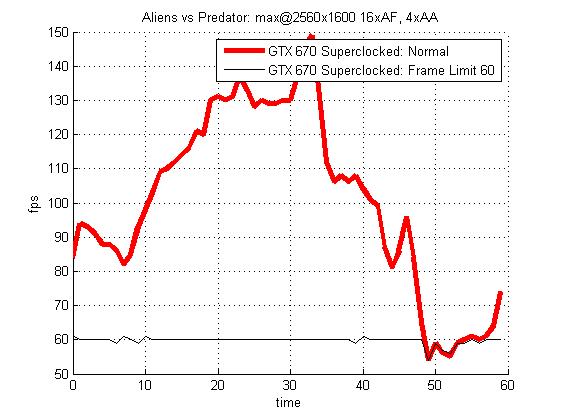
Frame rate target is a function Nvidia launched with its GTX 680 series. If your favorite game isn’t very demanding and your graphics card is capable of spewing out a super high frame rate, then you can limit it to 60fps or lower. In turn, this decreases GPU temperatures, noise and your electricity bill as well. 

Powerful graphics cards consume a lot of power, especially when the GPU constantly runs at full throttle. In case of the GTX 670 Superclocked card, we managed to slash consumption by 9W in Aliens vs. Predator by limiting the frame rate at 60fps. The resolution in question was 1920x1080. As you can see, the graph shows that our card dropped below 60fps at one point, rendering the frame rate target inactive.
 

frameTarget

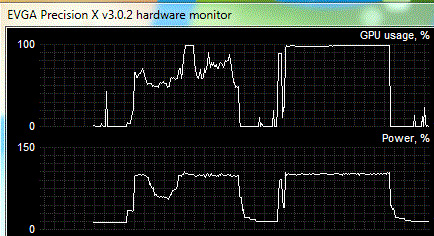
The graph we see on the picture below (right) shows the workload and consumption when frame rate target is off. On the left you see what happens when frame rate target is on. GPU was utilized to about 100% until we turned on the frame rate target option, which significantly decreased it. Additionally, consumption also went down. The values you see were measured while playing Aliens vs Predator at 1920x1080.
hardware-monitor

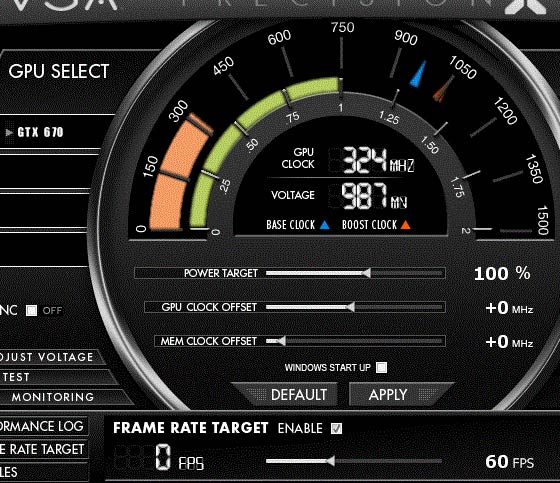
We used EVGA’s Precision v.3.0.2. and this tool allows setting frame rate target to any value from 25fps to 120fps. Note: you must restart the application for the setting to apply. 
frame-target-on


(Page 11 of 13)
Last modified on Sunday, 09 December 2012 16:46
blog comments powered by Disqus

To be able to post comments please log-in with Disqus


Facebook activity

Latest Commented Articles

Recent Comments