


Review: Vista in slippers, naked, undressed
All good things are worth waiting for. Well
the question is, have we received exactly what we were waiting for?
An ambitious mission from Redmond with high
expectations, nearly perfect opportunity to create an OS which will wipe out
the competition even if that means going against the free of charge man. As the
time went by, we kind of got an impression that our utopist expectations are
one thing and reality is different.
We got an opportunity to see and feel Vista
so we decided to give it a go and try everything that any other common "user
in slippers" would use it for. We wanted to try it as the people in their
houses will do. We tested the multimedia, gaming, music etc. So here we go with
our impressions.
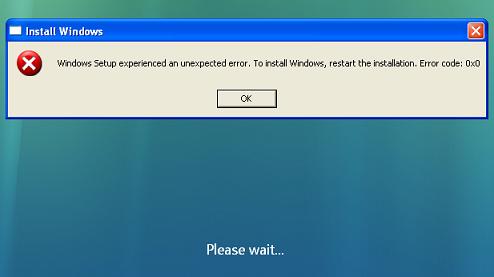
Caption – Here is what
you get if you try to start Vista installation
out of your XP
MN – “Ninety percent
of any business transaction is selling yourself to the client.”
-X. HOLLANDER
Aero, totally sexy interface is Vista’s main weapon. We have to admit, we fell for it.
After only few clicks you will fall in love with all of the visual tricks that Vista can do. It doesn’t matter if it is simple thing
such as moving the windows around, changing its size, or neat transparency of
windows and cute little previews of minimized windows, it all looks great. We
believe that Microsoft did one heck of a job. But, behind all that glamour,
there is something that users don’t really like, code name “one click too
many”. Most of the things are where they should be, with neat setup, looking
cool, but there are times when we need that function or program and we need it
quick and we don’t have the time to spend on sitting there all amused with sexy
Vista looks. The best annoying option is the security manager who warns you
about any unsigned driver, any installation program or similar. It gets really annoying.
When we start an application, Vista does it
like it’s a child game and browsing trough folders is quick and easy. We were
pleasantly surprised how Vista loads folders full of photos and thumbnails for
all of them. Impressive. However we were a bit disappointed with a fact that
there are no applications to transfer your photos for your digital camera to
your PC. Even now old Windows XP have an application capable of doing that
task.
The one thing we could not get used to was
Windows explorer. Not the one that one uses to surf the Net but rather to one
that you use to access your folders. Again, it looks stylish and glossy, in
what we can call the Aero Style. All of the people that were not happy with
their Windows Explorer that XP had to offer, will only smile on this one with
no interest at all.
If you love your desktop then you should
know that with Aero you will be able to do miracles. We already mentioned
effects, but only when you actually see it for yourself, live in action, you
will be able to understand what we are talking about. The old Alt+Tab is
replaced with Win-key+Tab and we can only try to describe how that looks. It is
lovely that video does not stop in this preview mode. Comparing it with Mac
OsX? Well, ok we admit that Vista is very
close to it, but still one step behind.
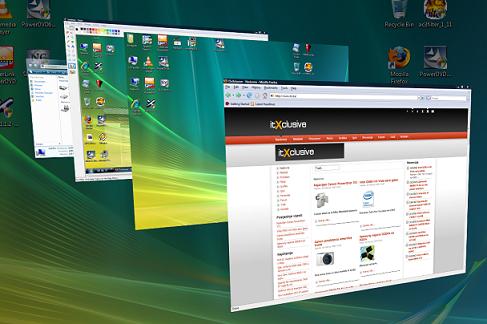
One of the main aces up
Vistas sleeve winkey+tab
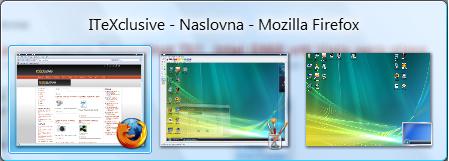
Even alt+tab got a face
lift
MN- “Fit worry about it tomorrow.” -S. O’HARA
So can a common user relax and enjoy
entertainment and multimedia with Vista Home? Answer is – maybe. Believe us,
all of you that crave for multimedia things, you have reasons to worry.
So, since Vista
is being advertised as next generation OS, one would think that it should not
have issues with next generation content. I have to disappoint you. And we even
had modest wishes, honest! Our attempt was to start any kind of HD video in
Media Player, we failed. 720dpi, 1080i and 1080p movies refused to work even
after we installed codecs made for h264 content. We did not ask any additional
options such as 7.1 sound or anything else like that. Just good old video on
our screen would do, but we got black screen instead.
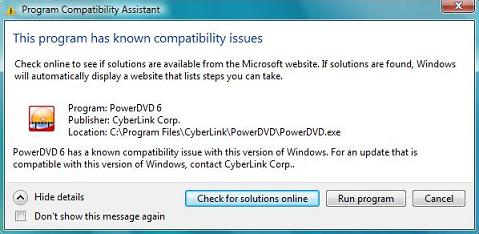
Caption-And now, all of
you I want you to reach in your pocket get your cash and buy all of the
applications that work.
Dear users, what follows is another cash
spending mission, you need to buy an application that can deal with the above
mentioned content. So what is going to happen once Blue Ray and HD DVD arrive
to consumers? Is Microsoft going to try to enable it’s trusty customers with
software that will allow us to watch that content on our Media Players? We are
not psychic, but we do have to advise you to stick to your XP on this matter,
at least for the time being. Especially if you use SPDIF. SPDIF will not work
under Vista, at least until we get a patch.
And when is that going to be, well not even Fudo knows that.
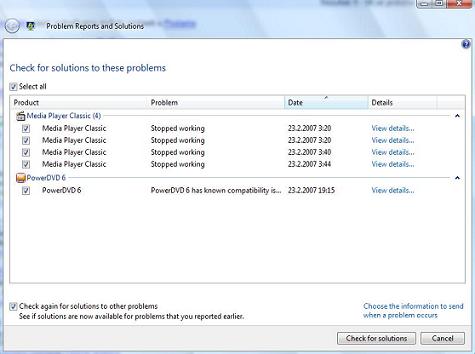
Caption- it all looks
nice, but this help system is useless
There is not too much what Vista can offer in this segment. I mean support for DVD
and multi-channel sound is old news in XP, and the mere fact that Vista
advertising that as one of the Vista’s
capabilities, is just sorry. We were kind of under the impression that it is
normal and totally expected for Vista to have
that. Or are we one step ahead the next-generation trends that are current in Redmond?
Games are still following the same path of
being slower with every new version of Windows. Try to remember what it was
like to move from DOS to Windows95. OK, so we tried with older titles such as
Neverwinter Nights, and No One Lives Forever 2. One can really feel performance
decrease. If we are to trust Fraps, games were slowed down for about 40%. Is
that up to drivers, Windows itself or something else, we can not really tell,
but gaming experience is – yuk! I believe that there is enough of you who enjoy
bit older gaming titles so I recon you are either going to skip Vista or you will make dual boot computer.
Trouble never comes alone, so gamer under Vista will have to worry with stability of games. In the
two games we tried, we encountered rendering issues, although we were never
“catapulted” back to Windows out of the game. It might be an issue with new
Catalyst 7.2.
MN- “"In times
of crisis, it is of utmost importance not to lose one's head." M.
Antoinette
Only lucky ones will not lose their head in
what comes after completing easy and totally automatic Windows installation.
The good news is that Vista comes with generic
drivers for almost all of the hardware, and bad news is that you don’t have
much use of those drivers.
Search for new drivers will almost always
end up as a quest that will lead you trough different forums where you can find
people with similar Vista issues like
yourself. But “lucky enough” there are plenty of people with plenty of Vista driver issues so you are most likely to find what
you need during the evening. That is only for motherboards and graphic cards
though, if you have any other exotic hardware on your computer, well then you
are doomed to look for them all night without guarantee that they will work. Vista is obviously not ready for users.
We have to admit that we got surprised by
option to shut down Vista and download
patches, install them and then shut down PC. What have we received with the
patches and updates we don’t know and we didn’t find any tools that could help
us discover what it is exactly that we have downloaded. We didn’t like such
secrecy and hiding things from users, it is very easy for Microsoft to install
any kind of spyware or something else that you would not install on your own.
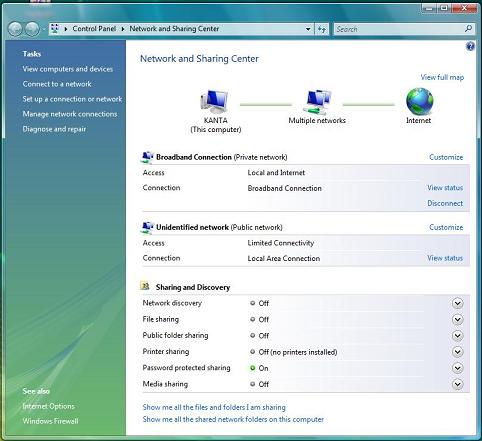
Caption_ network options
are simplified to the maximum
Applications that don’t work or semi work
under Windows are something that will annoy one really bad. Imagine that you go
out there and buy, let’s say Cyberlink deluxe HD DVD, and you can’t use it
under Vista. What would you do? Either you
will buy newer version or go and try to find a patch that won’t help you. And
there you are at the beginning. Media Player is not much of a help and you are
supposed to help yourself in that case?
Windows Vista offers possibility to search
its Help Internet data base to find a solution to your problem. We have to give
credit to this system because there is a tiny application that notes all
encountered problems so that you can view all of the given solutions. The only
problem is that there are not enough solutions you can find in Microsofts data
base.
Time that takes Vista
to start up is another story. “Naked” Vista
takes a bit more then 30 seconds to start up, XP on the other hand takes
roughly 15 seconds with all the antiviruses and spywares. Shut down process, XP
5 sec vs Vista’s 15 sec, basically time you are going to spend waiting is 2-3
times longer on Vista then on XP.
MN- “All’s well that ends well.” E.A. Poe
Conclusion
No sarcasm at all and totally serious, we
may conclude that Vista Home Premium is far from what we have expected. Beautiful Aero interface is only makeup that
covers many flaws.
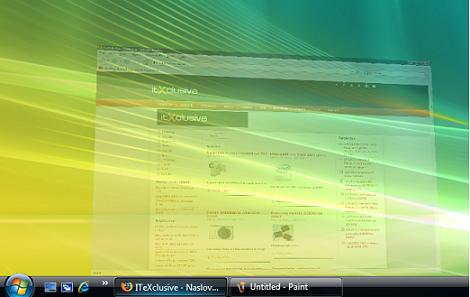
Hardly anyone can resist
the “wow” impressions Aero leaves on people.
Multimedia and fun, two most important
things for any user that decides to get this version of Vista
have failed. Vista is being advertised as next generation OS, but the trouble
that Vista encounters with next generation
devices are really sad. We hoped that Vista
would be something that any owner of HTPC could expect; sadly it turns out that
such users will have the most problems out of all.
Vista needs many fixes, it kind of gives the impression that the person
who was supposed to give the green light for the product was on a vacation and
someone approved it by accident. We do believe that things will drastically
change in the next year, but the mere fact that this version is worse then XP
does not give you many reasons to buy them at the moment. Especially if you XP
runs fine and you are happy with it. If that was not enough we should mention
that Vista Home Premium is 12GB “heavy”, and when you add on other applications
– you can notice that XP wasn’t that bad after all.


